Recording and results
How do I finish a game and record the winner?
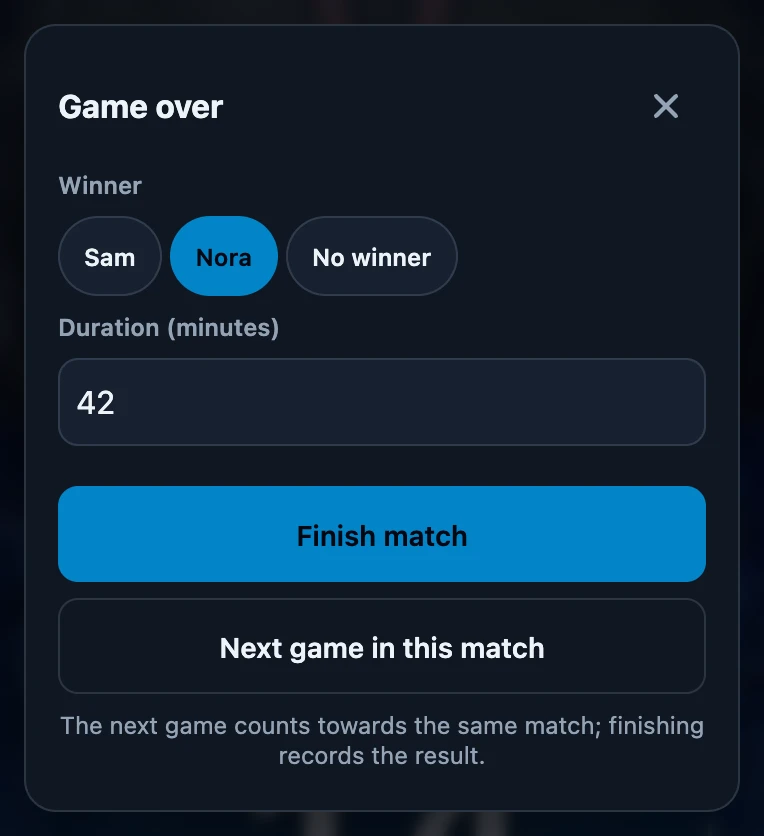
Open Game over: it appears by itself when only one player is left, or tap the menu button and choose Play → Game over. Choose the Winner or No winner, check Duration (minutes) and tap Finish match. Sign in before playing and stay signed in until the match is finished; New game and resetting a player never record a result.
On this page
Before you start
- Sign in before playing and stay signed in until the match is finished. A fresh signed-out table records nothing. After signing out during a tracked game, Game over can still be visible; sign back in with the same account first.
- The game starts with the first life change. On a signed-in phone, the first change to a life total starts recording the game in the background. Before that, there is nothing to finish.
- Put names on the seats. The winner buttons use the names on the seats; a seat without a name is shown as Unknown player.
Open Game over
- Automatically: when you answer Eliminated? with Yes and only one player is left, Game over opens with that player already chosen as the winner. This needs at least two players at the table.
- By hand: tap the menu button, go to Play and tap Game over. Use this for a concession, or when nobody was eliminated on the counter.
- Closing the sheet with × does not end anything. The game keeps running, and you can open Game over again from Play.
Record the result
- Choose the Winner, or No winner.
- Check Duration (minutes). It is filled in with the time since the game started. If you leave it as it is, the measured time is saved to the second.
- Tap Finish match. To play another game in the same match first, tap Next game in this match instead.
What happens next
- The table resets. Life totals go back to the starting life and extra counters disappear. The names on the seats stay. The next life change starts a new match.
- The result is saved on this phone first and sent as soon as there is a connection. As long as something is waiting, Play shows Still to sync: with a number.
- It appears in Club → History once it has been sent, with Won by and the duration.
- Players with a linked account get the result to confirm, unless they trust you automatically.
No winner is not a draw setting
There is no separate draw or tie option. No winner saves this game without a winner. If this is the only game in the match, the match counts as played and nobody wins it. With several games, the player with the most game wins wins the match; a final game without a winner does not erase earlier wins.
Resetting is not recording
- New game on Play asks you to confirm with Abort game while a game is being recorded. The game then stops being recorded and no winner is saved; what was already sent stays behind as an unfinished match.
- Changing the number of players or the starting life asks the same question.
- Resetting one player only puts that life total back. It does not end the game.
If it does not work
- No Game over on Play. No game is being tracked yet. Sign in and change a life total; allow a moment for the change to be processed.
- The match is not in History yet. It has not been sent. Make sure the phone has a connection; Play shows whether changes are still waiting.
- You chose the wrong winner. Open the match in Club → History and use Correct the result, within seven days.