Players and friends
How do I put myself, a friend or a guest in a seat?
Tap who is playing here? on a seat. Who plays here? opens with everyone you can choose: yourself, your saved friends under My friends, a New friend or a Guest. One person sits in one seat only, so choosing someone who is already seated moves them.
On this page
Open the player picker
- On the counter, tap who is playing here? at the edge of a seat. Once somebody sits there, the same button shows their name; tap it to change the player.
- Who plays here? opens, turned towards that seat, so the person sitting there can read it.
- Tap a name, or type one and tap Add or Use name. The sheet closes and the name is on the seat.
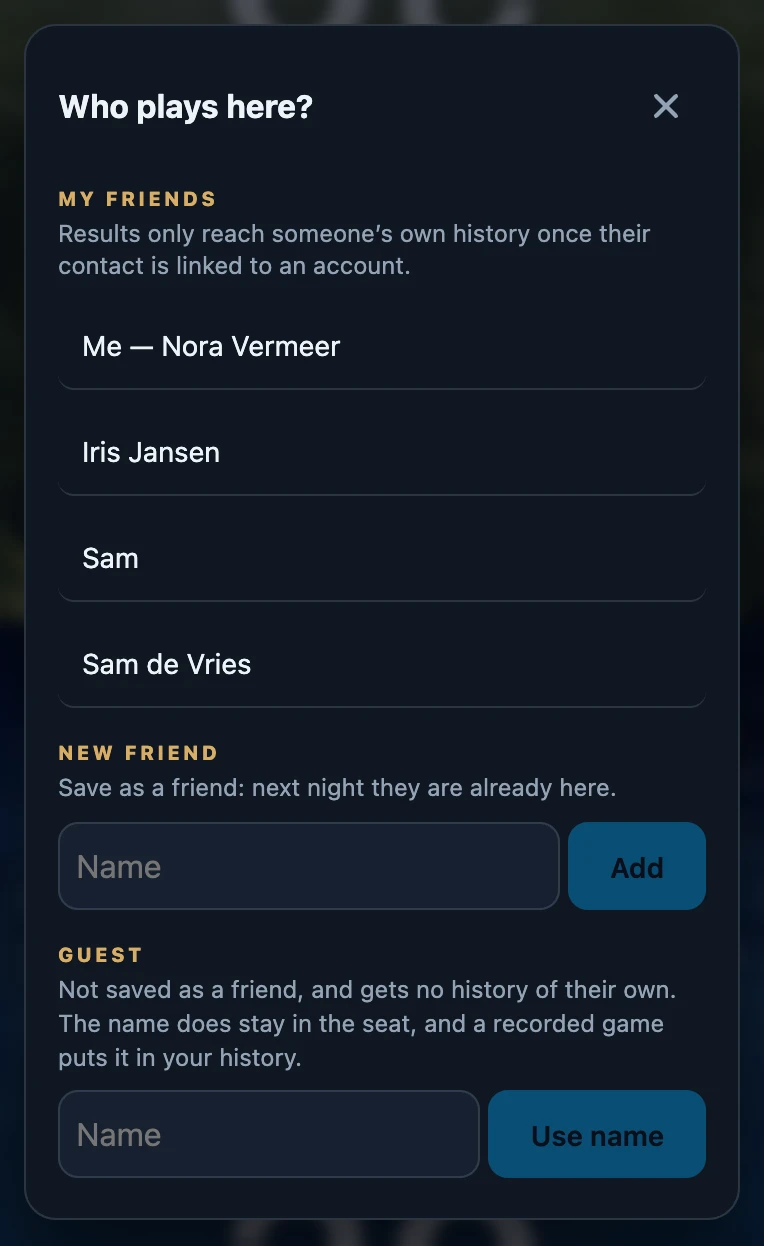
What each choice means
- Tonight only appears while a game night is open. It lists the people already on tonight's roster, at the top, so you do not have to look for them.
- Me followed by your name puts your own account in the seat. Games that are recorded land in your history.
- My friends is your saved list. A friend linked to an account also gets the game in their own history and statistics; for a friend that is Only with you, the numbers stay with you. With more than eight friends, a Search friend field appears.
- New friend saves the name in your friends list and seats that person straight away, so next time they are already in the list. If a friend with that name exists, the app first asks whether to Use existing or Create new anyway.
- Guest is a name for this seat only. A guest is not saved as a friend and gets no history of their own; a recorded game does show the name in your history.
One person, one seat
Somebody who already sits elsewhere shows in seat 2 (or whichever seat it is) next to their name. Tap them anyway and they move: a message such as Sam now sits in seat 1 appears, and the seat they left is empty again and shows who is playing here?. Guests count as the same person when only capitals or spaces differ.
There is no button to empty a seat. To swap a player out, choose the new player for that seat; whoever sat there simply leaves it.
What stays on the seat
- Names stay after New game and after closing the app. The seats are stored with the table in this browser on this device, not on your account.
- Choosing somebody who is not on tonight's roster adds them to it while a night is open.
- Changing a seat during a recorded game changes that seat in the game being recorded, not in games that are already finished.
- The name on a seat is a copy. If you rename a friend later, the old name stays on the seat until you choose that friend again.
Without an account
Signed out, Who plays here? only offers Guest. The name stays on the seat through the next game and a restart, but nothing is recorded. Signing out does not clear names that are already on the seats either.
If it does not work
- My own name is missing. You are not signed in, or you are already on tonight's roster: then you are at the top under Tonight.
- A friend is missing. The list comes from your account; without a connection the app shows the copy it last saved on this device. Friends are managed under Club → Friends.
- Games do not reach my friend's own history. That only happens for a friend linked to an account. Until then the friend is Only with you.
- I saved the same person twice. Merge the two entries under Friends, so their games count together.