Decks
How do I choose my deck or a friend's deck for a game?
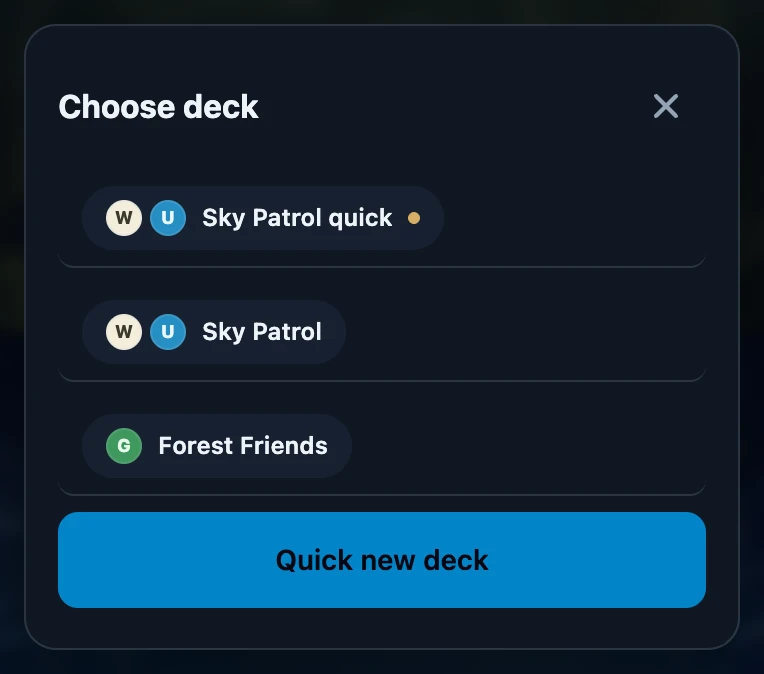
Tap choose deck on the seat and pick a deck in Choose deck. You can choose for yourself and for friends in your friends list. Guests have no deck list. For a player who joined your night with their own account, you see their active decks.
On this page
Before you start
Sign in and put someone on the seat first with who is playing here?. The decks you can choose belong to the person on that seat.
Choose a deck
- Tap choose deck at the top of the seat.
- Choose deck lists the active decks of the player on that seat. Provisional decks come first and have a small dot.
- Tap a deck. The seat shows its name and colours, and the seat's background takes on the deck's colours.
- To switch, tap the deck name on the seat and choose another deck.
Whose decks you see
- Yourself. Your own active decks from My decks.
- A friend who is Only with you. The decks you keep for that friend, which are also on their card in Friends.
- A friend who is Linked to an account. The active decks on your friend's own account. Decks you kept for them before linking moved to that account when you linked.
- A guest. Guests do not have a deck list. Save the player as a friend if you want to keep track of their decks.
- A player who joined your night with their own account. You see This account's decks. The player creates new decks on their own phone. with their active decks below it, as long as the night is open. A deck they just created on their own phone appears by itself, even while the list is open, as soon as both phones have a signal. Without a signal you see the list from last time. They can also fill in their deck afterwards in the match in their own History.
No active decks yet
Without active decks, Choose deck shows No active decks yet. For yourself or a friend, tap Quick new deck, pick the colours and tap Done: the new deck is placed on the seat straight away. Archived decks never appear in this list.
What is recorded
- The deck version counts. The seat remembers the deck's current version at the moment you choose it, and games are recorded with that version.
- Changing the deck during a game changes that seat in the game that is being recorded.
- The deck stays on the seat for the next game until you choose another one.
- Forgot to choose? A deck can still be filled in afterwards in the match in History.
If it does not work
- A friend's list says No active decks yet. That friend has no active decks, or only archived ones. Without a connection the list shows what this device loaded last.
- A deck made on another device is missing. Open Choose deck again with a connection so this device can fetch it.
- There is no Quick new deck button. The seat has no player yet, or it holds a guest or a player with their own account.
- I cannot change a deck I made for a linked friend. It is on their account; only they can finish or edit it.