Recording and results
How do I confirm, dispute or correct somebody else’s result?
Open Club → History → To confirm. For each match someone else recorded with you in it, tap Looks right ✓ when the result is correct. That's not right marks it as disputed, and Correct the result lets you change the winner or duration yourself, after which the others have to confirm again.
On this page
When a result asks for confirmation
- Someone else recorded the match, and your seat was linked to your account when the match was completed.
- Friends you trust automatically skip the question: their new results count as confirmed straight away.
- Club then shows Still to do with Check 1 result, and To confirm shows a number.
- The person who recorded the match does not confirm their own result, unless somebody else changes it.
A real result change arriving later from an offline phone also asks the other players to confirm again. An identical retry changes nothing. After completion, the recorder cannot reassign an already linked seat to another account.
Confirm a result
- Open Club → History and tap To confirm.
- Check the players, the winner and the duration on the card.
- Tap Looks right ✓. The card disappears.
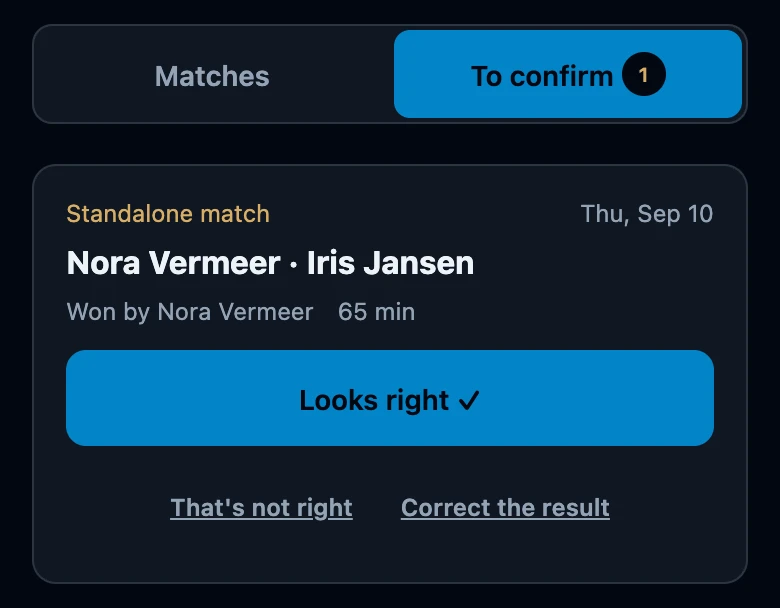
Your answer is saved on the phone and sent as soon as there is a connection, so confirming also works at a table without reception. The match details in History show the same Looks right ✓ and That's not right while your answer is still open.
Mark a result as wrong
- Tap That's not right.
- The app asks Is this result wrong? Tap Mark as incorrect, or Cancel to leave the question open.
- The match moves to Disputed by you.
- Group and season standings leave a disputed match out until someone corrects the result or it becomes final after seven days.
- Your personal statistics and the night standings do count it: they include results that are not confirmed yet.
- There is no button to withdraw a dispute. Correcting the result puts the question to everyone again.
Correct the result
- Tap Correct the result: on the card, under Disputed by you or in the match details.
- A warning says how many other players will have to confirm again.
- Choose the Winner for each game, or No winner, and adjust Duration in minutes if needed.
- Tap Save result. Result updated. The others will see it again. confirms the change.
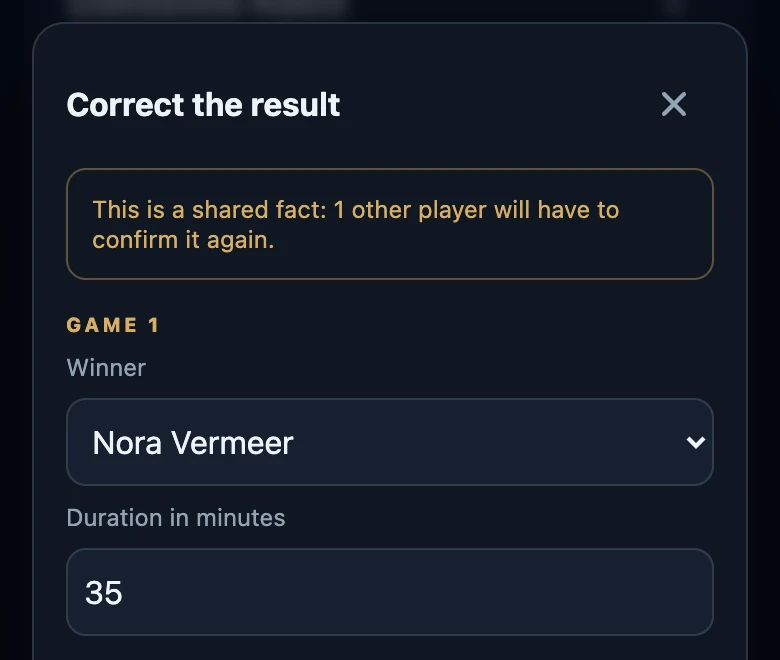
- Everyone else confirms again, including players who had already confirmed and friends who trust you automatically. Your own answer counts as confirmed.
- If you did not record the match, the person who did now has to confirm too.
- Who can correct: the person who recorded the match and every player with a linked seat, until the result is final.
- Correcting needs a connection. Without one, The result could not be updated. appears.
If something looks off
- Nothing to confirm. You are all caught up. No result is waiting for you.
- A match left To confirm without an answer. After seven days the result is final and the question disappears.
- Your answer could not be saved. Try again; nothing was changed.