Recording and results
How do I correct a player or fill in a missing deck?
Open the match under Night → Games, or in Club → History. Choose your deck in the list below your name; that is saved right away. If you recorded the match, Who sat here? puts the right player on a seat, also when a player with an account was there; the others then have to confirm the result again. For a night with several matches without your deck, use Fill everywhere. The winner and duration are changed separately, with Correct the result.
On this page
Which change, which way
- Your own deck: the deck list below your name. This works on every match you played in, also one someone else recorded.
- The deck on someone else’s seat: only the person who recorded the match, and only with decks belonging to the player on that seat.
- Who sat on a seat: only the person who recorded the match, with Who sat here?, for a guest, a friend, Unknown player or a player with an account. If a player with an account was on it, this changes the result: the others confirm again, and it only works within seven days of finishing.
- Winner and duration: use Correct the result. Afterwards the other players have to confirm again.
Choose your deck
- Open Club → History and tap the match.
- Below your name in each game, open the list that says No deck selected or the current deck.
- Choose the deck. Deck changes are saved right away. There is no separate save button.
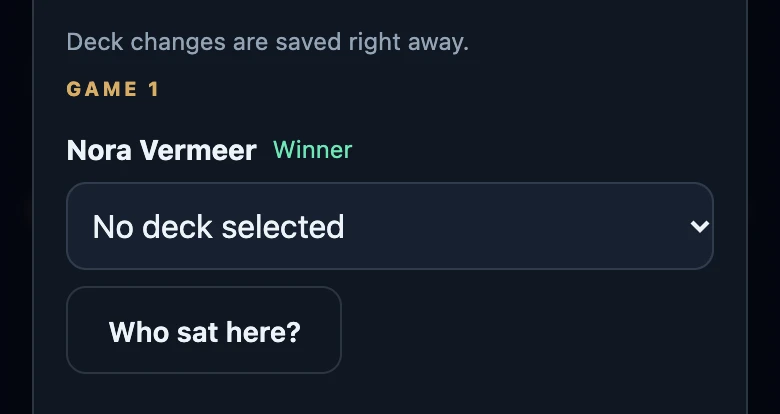
Each game has its own list, so in a match with several games you choose the deck per game. Choosing No deck selected removes the deck from that game.
Fill in one deck for a whole night
Did you play several matches in one night without a deck on your seat? Then History shows a Deck missing banner for that night.
- Choose the deck in the list that starts with Choose your deck.
- Tap Fill everywhere. A message says in how many matches the deck was added.
- Only your own seats without a deck in that night are filled; decks already chosen stay.
- Only your own decks are offered, and the current version of the deck is used.
- The banner shows one night at a time. After filling, another night without decks may appear.
Correct who sat on a seat
- Open a match you recorded yourself: under Night → Games, via Night → All game nights (tap the night), or via Club → History.
- Below the seat, tap Who sat here?.
- Pick the player from the list: yourself, whoever was there that night, and your friends. Or type a name in Or enter a guest name and tap Use.
- The new name appears straight away. If the same player was on that seat in every game of the match, all of them are corrected at once; untick that if it only applies to one game.
- If a player with an account was on the seat, the result changes. The other players, including whoever was there first, are asked to confirm the game again. The player who was taken off still sees the game and can choose That's not right.
- A seat with an account can only be corrected on a finished match, within seven days. After that the result is final. Only the person who recorded the match can do it, not a fellow player.
- Filling in a friend with a linked account on a completed match gives that player the result to confirm.
- The deck on that seat is removed: it belongs to the previous player. Choose the right deck afterwards.
- Swapping two players between seats is not possible: someone already in the game is not in the list. If only the win went to the wrong one of the two, change the winner with Correct the result. Adding a seat afterwards is not possible either.
After seven days
Once a result is final, the winner and duration are locked, and so is who sat on a seat with an account. You can still choose or change your own deck on your own seat. The recorder can also still change decks and fill seats without a linked account. The same ownership rules continue to apply.
If it does not work
- This change could not be saved. There was no connection, or the deck does not belong to the player on that seat. The list goes back to what it was.
- There is no deck list below your name. You have no active decks yet. Create one under Club → Decks.
- Bulk fill failed. Nothing was filled in; try again with a connection.