Decks
How do I add a deck version and set list visibility?
After rebuilding a deck, open it in Club → Decks and tap Add version. Recorded games keep their version; seats where you choose the deck afterwards use the new one. List visibility is set to Private or Public in Edit deck.
On this page
Edit the link or add a version?
- A typo or a moved link. Tap Edit deck and change List URL (optional). That changes the current version itself; no new version is made.
- The deck was rebuilt. Tap Add version. The earlier version, and the games played with it, stay as they are.
Add a version
- Open Club → Decks and tap the deck.
- Under Versions, tap Add version.
- If you like, fill in Label (optional) (up to 60 characters), List URL (optional) and Notes (optional).
- Tap Save. The version appears at the bottom of Versions, for example as v2, and is now the current version.
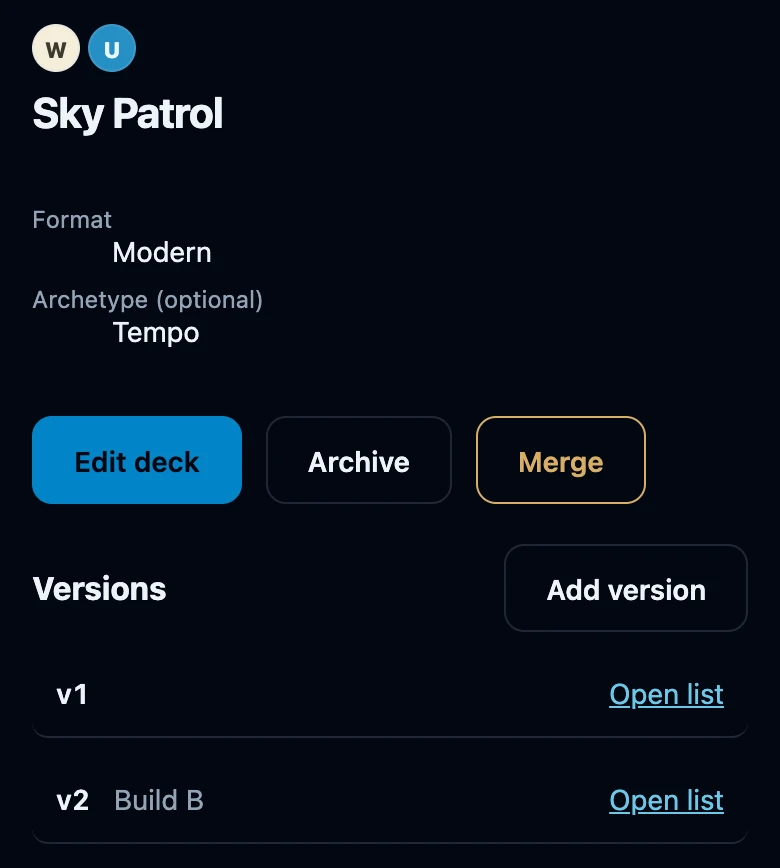
What a new version changes
- Recorded games keep their version. Games already played stay linked to the version they were recorded with.
- Choose the deck on the seat again. A seat remembers the version that was current when you chose the deck. A seat that already had this deck keeps recording the old version until you choose the deck there again.
- Statistics per version. Stats for this deck on the deck page shows figures Per version once games with the deck have finished.
- Notes are saved but not shown. The app currently does not display a version's notes anywhere.
- No undo. There is no button to edit or delete a version afterwards.
List visibility
Tap Edit deck, choose Private or Public under List visibility and tap Save. Saving Edit deck also finishes a provisional deck.
- Private is the default. The list link of your deck is only sent to your own account.
- Public also sends the link of the current version to the apps of friends who have you as a linked friend. At the moment none of their screens shows that link: they see your deck with its name and colours.
- Name and colours are always visible to those friends, whichever you choose.
- It does not protect the other website. Private only affects Wizards' Club. Anyone who has the address can still open the list if it is public on the site where it lives.
If it does not work
- The new version is not used at the table. Choose the deck on the seat again.
- Nothing happens when I tap Save. Check that the list URL is a complete address starting with https:// or http://, or leave it empty.
- No connection. Try again once you are back online. Adding a version and editing a deck need a connection; nothing has been saved.
- Open list does not appear after editing the link. Open the deck page again.