Recording and results
How do I find past matches and use filters?
Open Club → History. The newest matches are at the top. Tap Filters to choose a game night, an Opponent, a deck or Unfinished only. Every active filter appears as a chip next to the button; the × on a chip removes that filter, and Clear filters removes them all.
On this page
Which matches appear
- Matches you played in, also when someone else recorded them and your seat is linked to your account.
- Matches you recorded for others, even when you did not play yourself. They appear in History but do not count in your own statistics.
- Each row shows the night’s name or Standalone match, the date, the players, Won by with the winner of the last game, the total duration, the confirmation status and the decks played.
- Unfinished matches show Unfinished instead of a winner.
- History is kept on this phone, so it also opens without a connection. New matches appear once the phone has synced.
Use the filters
- Tap Filters. A number on the button shows how many filters are on.
- Choose a night in the list that starts with All game nights.
- Tap Opponent and choose a name, or Everyone.
- Choose one of your decks in the list that starts with All decks.
- Tick Unfinished only to see only matches without a result.
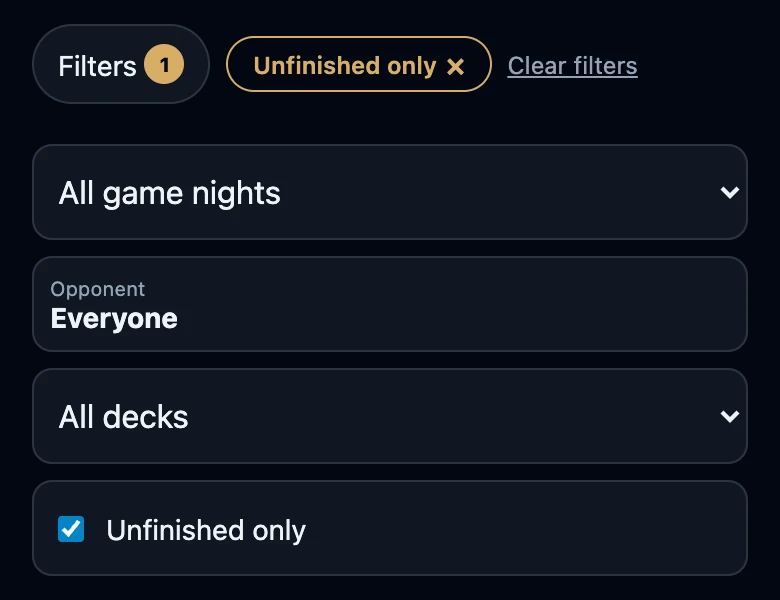
Filters combine. Opponent together with Unfinished only shows only unfinished matches against that opponent. When nothing matches, History says No matches found for these filters.
Remove filters
- The × on a chip removes that one filter.
- Clear filters removes all of them at once.
- Chips stay visible when the filter panel is closed, so a shortened list never looks complete.
- This phone remembers whether the filter panel was open. The filters themselves are cleared when the app is reloaded.
What the filters can find
- Opponent lists friends and players with an account. Guests who only had a name typed in are not in that list.
- The deck filter finds matches in which you played that deck yourself, not matches in which an opponent used a deck with that name.
- Show more at the bottom of the list shows the next 20 matches.
Straight to unfinished matches
When you have unfinished matches, Club shows them under Still to do, for example Finish 2 games. Tapping that opens History with Unfinished only already on.
If you cannot find a match
- The list is empty or short. Look at the chips next to Filters and tap Clear filters.
- A match is missing altogether. It has not been sent from the phone that recorded it yet, it was deleted, or your seat is not linked to your account.