Groups and statistics
How do I create a group and manage its members?
Open Club → Groups, tap Create group, enter a Name and tap Save. Open the group to add friends under Add contact, or take someone off with Remove. Only you, as the owner, see and manage the group, and removing a member leaves results already played as they are.
On this page
Before you start
- You are signed in and have a connection. Groups are managed directly on the server. Without a connection the app shows No connection. Try again once you are back online. and nothing changes.
- Members come from your own friends. Only people under Club → Friends can be added. Save someone as a friend first if they are not there yet.
- There is no invitation. Other people cannot join a group themselves, and there is no link or code for it.
Create a group
- Open Club and tap Groups. The page is called My groups.
- Tap Create group and enter a Name. Save stays inactive while the name is empty.
- Tap Save. The group appears in the list with its number of members; you are its first member.
Cancel closes the field without creating anything. You can create more than one group. As soon as you have one, the page shows Multiple groups above the list: that marks a feature that may later belong to Club, and it does not stop you today.
Add or remove members
- Open the group from My groups.
- To add someone, tap their name under Add contact. They move to Members straight away, without a question.
- To remove someone, tap Remove next to their name. The app asks Remove member? with the text that results already played stay as they are.
- Tap Remove to confirm, or Cancel to keep the member.
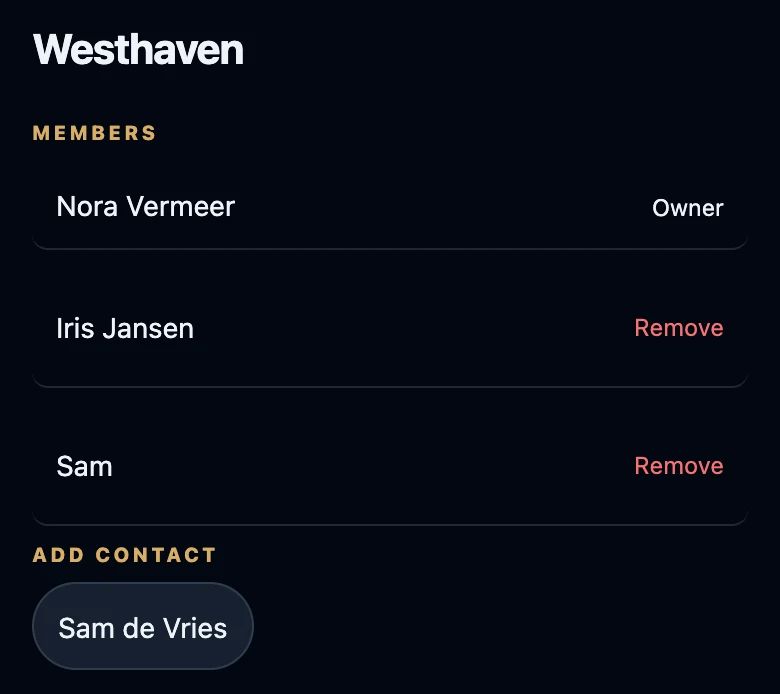
Add contact only lists friends who are not in the group yet, so the heading disappears once everyone is added. Your own row says Owner and has no Remove.
What membership does and does not do
- Only the owner sees the group. A member linked to an account does not get the group under their own Groups and cannot open its standings.
- Membership does not decide the standings. Season standings come from the game nights you link to a season. Someone who plays at a linked night appears in them even without being a member.
- Removing a member deletes nothing else. Matches, history and statistics stay exactly as they were.
- The app has no rename or delete for a group. Choose the name with that in mind.
A group is not tonight’s roster
Tonight’s roster is who is at the table for one night, managed in Night → Manage night. A group is a lasting collection of nights and seasons. Adding someone to a group does not put them on tonight’s roster, and the other way round. To bring a night into a group, choose the group under Group in Manage night.
If it does not work
- Add contact is missing. You have no friends yet, or all of them are already members.
- A friend does not appear. Save the person under Club → Friends first, then open the group again.
- No connection. Try again once you are back online. Nothing was added or removed; try again once you have a connection.
- A member cannot find the group. That is expected: only the owner sees it.