Game nights
How do I manage tonight's roster and guests?
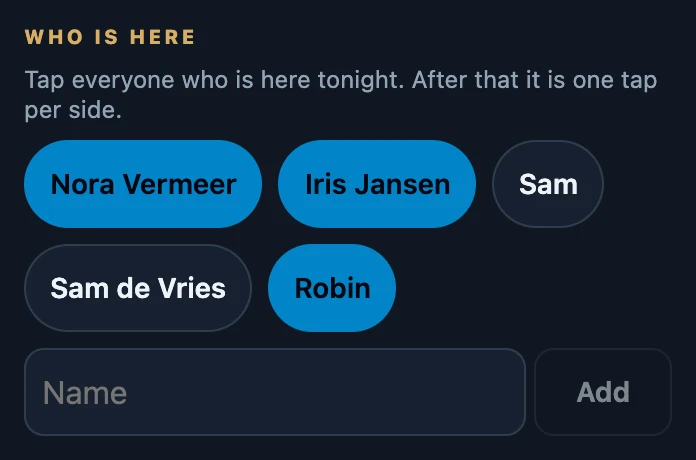
Open Night → Manage night. Under Who is here you tap yourself and your friends, and you add a guest by typing a name and tapping Add. Everyone on the roster appears under Tonight when you choose a player for a seat. Tap a name again to remove it, as long as that person has not played a game tonight.
On this page
Before you start
- An open night on this phone. Without one, Manage night is not there.
- You are a host of the night. That is the person who started it and every device that joined it. Someone who was only put on the roster sees the night, but can only change it after tapping Join in.
Mark who is here
- Open Night and tap Manage night.
- Under Who is here you see yourself and your friends. Tap everyone who is here tonight; a highlighted name is on the roster.
- For someone who is not in your friends list, type the name in the Name field and tap Add.
- Close the sheet. Who is here on the Night page shows the roster.
A guest is a name for tonight: not a saved friend and without their own history. Adding people also works without a connection; the roster is sent once you are online.
Who is added automatically
- A player you choose for a seat goes onto the roster if they were not on it yet.
- Players who were already seated when the night started are added at that moment.
- A phone that joins the night puts its own account on the roster. It also appears after Connected devices.
Tonight when choosing a player
Tap the name on a seat of the counter. Who plays here? shows Tonight at the top, with everyone on the roster, followed by My friends. A person who already sits somewhere shows the seat, for example in seat 1. That way you seat tonight's players, guests included, with one tap.
Remove someone from the roster
- Open Night → Manage night.
- Tap the highlighted name under Who is here. A friend is no longer highlighted; a guest or another account disappears from the list.
- This player already played a game tonight. Someone who had a seat in a recorded game tonight stays on the roster, because those games refer to them.
- The same message right after adding someone. Removing only works once the addition has reached the server. Wait a few seconds and tap the name again.
- No connection. Try again once you are back online. Removing needs a connection.
What other devices see
Every device connected to the night uses the same roster, but not instantly. Another phone picks up changes when it syncs: when you open a page there, bring the app to the front, or after about a minute. Life totals are never shared; every phone keeps its own counter.
If it does not work
- A friend is missing from the names. Only people in the friends list of this account appear. Save them as a friend, or add them as a guest for tonight.
- Manage night is missing. There is no open night on this phone yet.