Game nights
How does a game night start, automatically or by hand?
When you are signed in and this phone has no open night, a night starts by itself as soon as you change the first life total of a game. You can also open Night and tap Start a night. Is a night of yours still open on another device? Then Night shows Resume this night: tap it first, so you do not start a second night.
On this page
Before you start
- Sign in. Without an account the counter works as usual, but no night starts. Night then explains that a night begins by itself once you are signed in, and offers Sign in for your game nights.
- One open night per phone. Everything you record on this phone lands in that night.
Automatically at the first life change
You do not have to do anything. When you change a life total on the counter, the app starts recording the game. If this phone has no open night yet, it starts one at the same moment. Players who are already seated go straight onto tonight's roster.
This also works without a connection: the night is kept on the phone and sent once you are online again.
Start a night by hand
- Open Night in the menu.
- Tap Start a night.
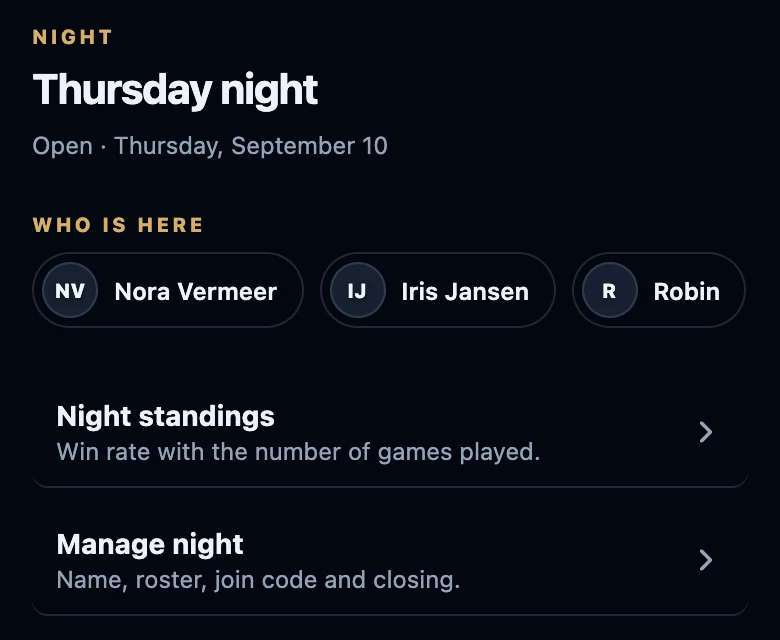
- The page now shows the night with Open and the date, Who is here, Night standings and Manage night. Below that, Games lists the matches recorded on this night.
Tapping the button twice does not create two nights: as soon as a night is open, Start a night is gone.
What the night is called
A new night is named after the date, in the language of the app, for example Monday, September 14. To change the name, open Night → Manage night, tap Rename, type a name under Name of this night and tap Save.
When Resume this night appears
When this phone has no open night, Night asks the server whether an open night involves you. That needs a connection. You then see one of these instead of Start a night:
- Your own night, open on another device: its name and date with Resume this night and Close it and start today. Resume this night makes it the night of this phone too.
- A friend's night that you were put on: Night at followed by the host's name, with Join in.
Avoid two nights at once
- Open Night before you play on another phone. The counter itself does not look for a night on other devices. A life change on a phone without its own open night starts a new night, even while your night on the other phone is still open.
- Started two after all? Close the one you do not need via Night → All game nights → Close night under that night. Games already recorded in it stay with that night.
- Close it and start today is meant for a night from an earlier day: it closes that night and opens a new one for today.
If it does not work
- There is no Start a night button. You are not signed in, this phone already has an open night, or Night shows a night that is open elsewhere.
- The night could not be started. Try again.
- Yesterday's night is gone. A night without activity closes by itself after six hours. The person who started it can reopen it within 24 hours.