Offline and recovery
What works offline, and what needs a connection?
After the app has fully loaded and been saved by your browser, the counter works offline, signed in or not. While signed in, recorded games, new friends, quick decks, game nights and confirmations can be saved locally and sent later. Most other account, friend, deck and group management needs a connection.
On this page
The first visit
Let Wizards’ Club load completely with a connection so the browser can save the app for offline use. Then check that it opens without a connection on this device before relying on it at the table. Creating an account and signing in need a connection. An existing saved sign-in can be restored offline.
Works without a connection
- The counter. Life totals, extra counters, commander damage, names on the seats, backgrounds, Game settings and New game are kept on this device and need no account.
- Random pairings under Night. The draw fetches nothing and records nothing.
Saved now, sent later
While you are signed in, these also work at a table without reception. They are saved on the phone straight away and sent once there is a connection:
- Recording a game: life changes, Game over, the Winner and Finish match.
- Adding a friend, and a quick deck with Done.
- Game nights: starting a night, adding people to tonight’s roster and closing the night.
- Confirmations: Looks right ✓ and That's not right.
Until they have been sent, Play shows Still to sync: with a number under Service. Other players and your other devices only see these changes after that.
What you can still look at
- History opens from the copy on this phone, filters included.
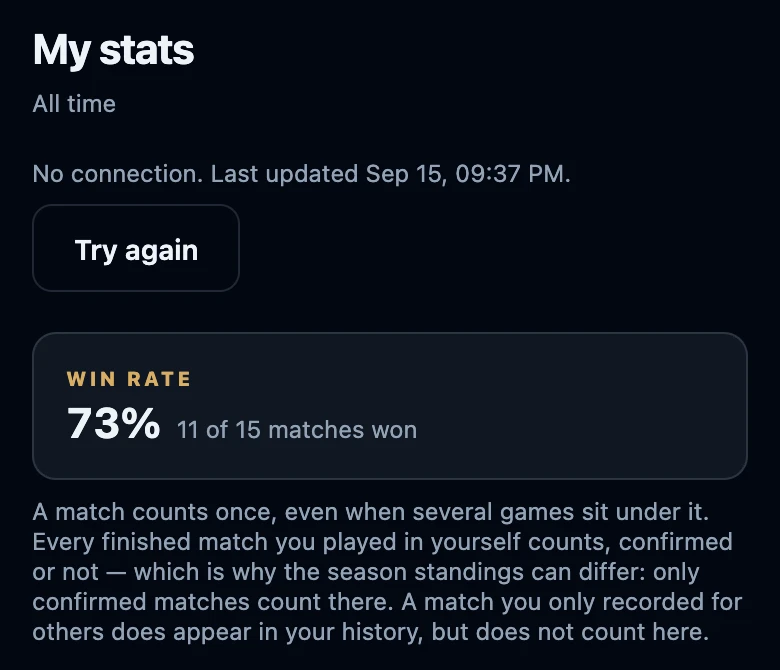
- Statistics shows your numbers from the last visit on this device, with No connection. Last updated and the date and time, plus Try again. If they were never loaded on this device, you only see that there is no connection.
- Friends and Decks show the list last saved on this device. Friends also says No connection. Try again once you are back online.
- Night still shows the night that is open on this phone, and Choose deck shows the decks this device loaded last.
- Tonight's standings say No connection. These are the standings from the last time you were online. These standings only stay in memory while the app remains open; they are not saved for an offline restart.
Signing out removes this copy from the device. The table on the counter stays.
Needs a connection
- Account: creating an account, signing in, resetting a password and saving your profile.
- Friends: renaming, merging, deleting, linking to an account and searching by username.
- Decks: the full deck form, versions, archiving, taking over and merging, and the numbers of a deck.
- Game nights: joining a night from another device, reopening a night, removing someone from the roster, linking a group and season, and the summary.
- Results: completing an unfinished match, correcting a result, private notes and deleting a match.
- Groups and seasons, including season standings. Groups are not kept on the device for offline use.
Without a connection these show No connection. Try again once you are back online. or a similar message, and nothing is changed. Try again once you have reception.
When the connection comes back
There is nothing to press. The app sends waiting changes by itself: as soon as the connection returns, when you open the app, and about every minute while something is waiting. It fetches what others changed when you open the app or bring it to the front, and about every minute while it is on screen. If the server refuses a change, Play shows Needs attention (see check pending sync and recover rejected changes).
If it does not work
- The app does not open without a connection. It may not have finished saving its files, or the browser may have removed them. Open it with reception, let it load completely and check offline use again.
- Still to sync stays at the same number. The phone has no working connection yet. Keep the app open with reception for a moment; the number drops as changes go out.
- A new result is missing on another phone. It only appears there after the recording phone has sent it and the other phone has synced (see why a match is missing).
- Statistics show an old date. Those are saved numbers. Tap Try again once you are online.